Most delay plugins give you one echo and a feedback knob to multiply it. A multi-tap delay is a different instrument. You get many separate echoes, called taps, and you place each one yourself: its own time, its own level, its own pan, and often its own filter or pitch. That is what makes rhythmic throws, ping-pong that walks across the stereo field, vocal halos, and evolving cascades possible. A normal delay repeats a sound. A multi-tap delay lets you compose the repeats. The catch used to be price. The famous multi-tap effects came from Eventide and Waves, and the deepest one still lists at $149. That has changed. There is now a genuinely free multi-tap that runs on Linux, a $34.99 one built around a visual editor, and the old classics go on sale so often that paying full price is almost a mistake. Below are the multi-tap delays worth owning in 2026, what each one is actually good at, its honest limits, and how to choose. Every price here was verified against the manufacturer's own store or official retailers.
DLAY
$34.99Best overall, and the best value
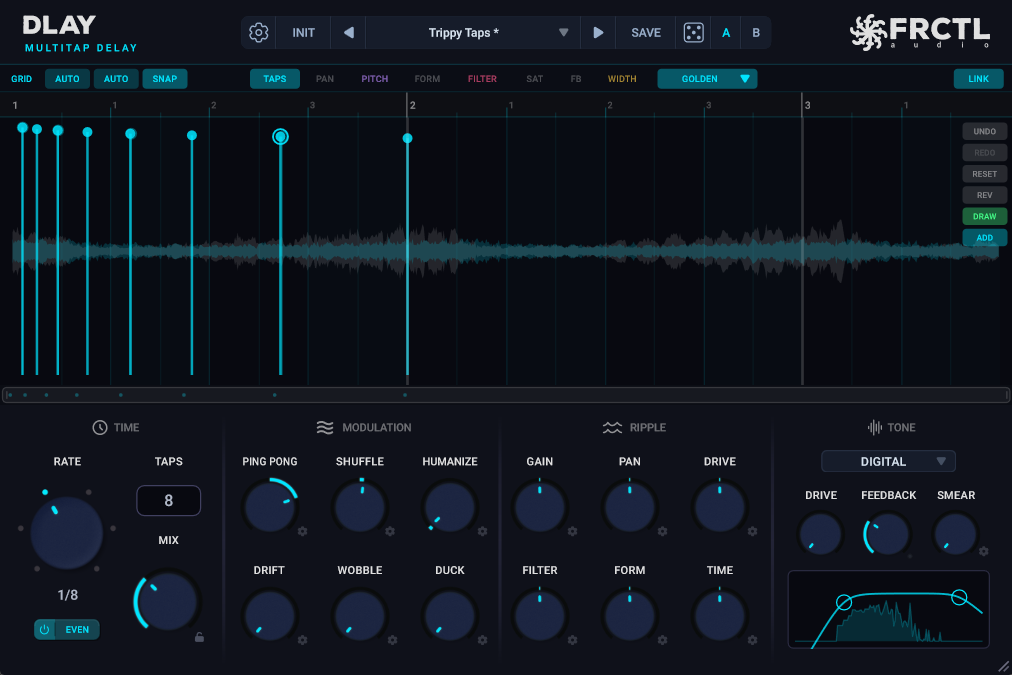
DLAY earns the top spot on one clear strength: nothing else here lets you place up to 64 taps on a single timeline and shape them by hand the way it does. Drag a tap where you want it. Rubber-band a group and move them as one. Switch the editor between six views (level, pan, pitch, formant, filter, saturation) and draw that one parameter across every tap at once. Most delays make you type numbers into a tap. This one you shape like a clip in your DAW.
The part that pulls ahead of the field is per-tap pitch and formant. Every tap can move up or down two octaves and shift its formant on its own, so an octave-up tap still sounds like a voice instead of a chipmunk. Vocal halos, octave-down dub trails, chords built out of echoes, all with no separate pitch shifter on the channel. Seven character modes swap the whole feedback path (DIGITAL clean, TAPE warm, BBD grainy, VINYL wow and crackle, RADIO band-limited, plus SPACE and LOFI), and six ripple knobs cascade one value across every tap, so a hundred small edits become one twist.
It ships with 168 presets across 14 categories, an interactive filter curve with a live spectrum underneath, A/B compare, and full DAW automation on every tap. It runs as VST3, AU, and CLAP on Windows, macOS, and Linux, the widest coverage on this list. $34.99, with a 14-day money-back guarantee and lifetime updates. The honest limit: pitch and formant are the heaviest thing in the plugin, so a project stuffed with pitched taps will ask more of your CPU than a plain echo would.
Pros
- +Up to 64 taps on a visual editor you shape by hand, not knob-by-knob
- +Per-tap pitch and formant (two octaves either way) with no extra plugin
- +Six view modes: level, pan, pitch, formant, filter, saturation across all taps
- +Seven character modes, from clean digital to broken vinyl and broadcast radio
- +Six ripple knobs cascade a value across every tap at once
- +Twelve rhythm patterns (tresillo, clave, swing, polyrhythms, bouncing-ball)
- +168 presets, A/B compare, full per-tap DAW automation
- +VST3, AU, CLAP on Windows, macOS, and Linux
- +$34.99 with a 14-day money-back guarantee and lifetime updates
- +Free DLAY Lite (up to 12 taps, two knobs) to try the workflow first
Cons
- −Pitched and formant-shifted taps are the heaviest on CPU (clean taps stay light)
- −No AAX format, so no native Pro Tools support (VST3, AU, and CLAP only)
- −Overkill if all you want is one slapback or a two-knob ping-pong
Best for: Producers who want to design the echo trail itself, rhythmic cascades, vocal halos, per-tap pitch, without paying $99 to $199 for it. The best price-to-capability in multi-tap delay right now.
Learn more →Try it free for 14 days →Eventide UltraTap
$99 (often ~$49 on sale)Best for swells and volume-shaped bursts
UltraTap is the multi-tap most people have actually heard, usually without knowing it. It can throw up to 64 taps, but hand-placing each one is not the point. The point is the macro controls: Spread bunches the taps together or fans them out in time, Slurm smears them into a modulated wash, and Chop gates the tail into rhythmic stutters. You shape a whole cloud of taps with a few knobs rather than drawing them one at a time.
That makes it fast at a specific thing: pad swells, reverse-style blooms, rhythmic bursts, and the pre-delay-into-reverb move Eventide built its name on. Over 150 presets get you there quickly. Where it stops short of DLAY is per-tap control. There is no drawable timeline, no per-tap pitch or formant, and the taps share one character rather than each carrying their own. Price is a moving target: it lists at $99 on Eventide's own store, but it is discounted so regularly (often down to around $49) that paying full price rarely makes sense.
Pros
- +Up to 64 taps shaped with Spread, Slurm, and Chop macros
- +Genuinely fast at swells, blooms, and rhythmic bursts
- +Over 150 presets, plus modulation and reverb-like diffusion
- +Frequently discounted to around $49
Cons
- −No hand-drawn tap timeline, you shape the cloud, not each tap
- −No per-tap pitch or formant
- −Windows and macOS only, no Linux
- −List price is high for what it does until it goes on sale
Best for: Producers who want volume-shaped swells and rhythmic tap bursts fast, and who will wait for one of its very frequent sales.
Waves SuperTap
$79 (often $29.99)The classic six-tap, cheap and everywhere
SuperTap is the old-guard multi-tap, and it still earns a spot. You get six independent stereo taps, each with its own time, level, pan, and filtering, plus modulation and feedback. It is not trying to be clever. It is a clean, dependable six-tap delay that handles rhythmic patterns, wide stereo spreads, and thickening better than most, and it has been a mix-room staple for years.
The reasons to look at it are price and ubiquity. It lists at $79 but sits at around $29.99 most of the time, and if you already own a Waves bundle or one of the Waves subscription tiers, it may be on your drive already. The reasons to look elsewhere: six taps is a hard ceiling next to DLAY's 64 or UltraTap's cloud, there is no per-tap pitch, and the interface shows its age. Windows and macOS only.
Pros
- +Six independent stereo taps with per-tap time, pan, and filtering
- +Clean, reliable, and a long-time professional staple
- +Usually around $29.99, and often already in a Waves bundle or subscription
- +Good at rhythmic patterns and wide stereo thickening
Cons
- −Six taps is the ceiling, no growing past it
- −No per-tap pitch or formant
- −Interface shows its age
- −Windows and macOS only, no Linux
Best for: Producers who want a proven, cheap six-tap delay for rhythmic patterns and stereo width, especially if a Waves bundle already put it on their drive.
PSP 608 MultiDelay
$149 (sometimes ~$25 on sale)The deepest routing, if you like to tinker
If UltraTap is the fast one and DLAY is the visual one, the PSP 608 is the engineer's one. It runs three modes (Multidelay, Multitap, and MultiFB) and gives each tap its own gain, width, time, filtering, modulation, saturation, and even a touch of reverb. The routing goes deep. You can build delay structures here that the simpler plugins cannot reach.
The trade is the learning curve and the look. It is a dense, knob-heavy plugin from an older design era, and getting a sound out of it takes patience and some reading. It lists at $149, which is steep, but PSP puts it on deep sale periodically (as low as around $25), and at that price it is a lot of delay for the money. Windows and macOS, no Linux.
Pros
- +Three modes and very deep per-tap routing (gain, width, filter, modulation, saturation, reverb)
- +Builds delay structures the simpler plugins can't reach
- +High sample-rate support, long-standing and stable
- +Discounted to around $25 during periodic sales
Cons
- −Steep learning curve and a dense, older interface
- −$149 list price is high, so wait for a sale
- −No visual tap timeline or per-tap formant
- −Windows and macOS only
Best for: Producers and sound designers who enjoy deep routing and want maximum control per tap, and don't mind a dense interface and a wait for the sale price.
ChowMatrix
FreeBest free, and genuinely strange
ChowMatrix is the free one, and it is the most unusual delay on this list. Instead of a row of taps, you grow a tree of them. Every node feeds child nodes, each with its own time, pan, feedback, filtering, and distortion, so the delay branches outward into structures you build by adding nodes. An Insanity control lets each node wander on its own for drifting, unstable textures.
It is open source and genuinely free, not a stripped demo, and it is the only multi-tap here besides DLAY that runs on Linux (it also covers Windows, macOS, and iOS). It will not give you UltraTap's polish or DLAY's per-tap pitch, and the node-tree takes a minute to think in. But for ambient beds, modular experiments, and never-ending drones, nothing free comes close.
Pros
- +Completely free and open source
- +Node-tree routing builds branching multi-tap structures
- +Per-node time, pan, feedback, filter, and distortion, plus an Insanity wander control
- +Runs on Windows, macOS, Linux, and iOS
Cons
- −The node-tree concept takes some getting used to
- −No per-tap pitch or formant
- −Less polished than the paid options
- −Better for ambient and experimental work than tight rhythmic delays
Best for: Anyone who wants a capable multi-tap delay for zero money, especially on Linux, and producers chasing ambient, modular, or drifting textures.
Comparison Table
| Plugin | Price | Max Taps | Per-Tap Pitch | Editing | Platforms |
|---|---|---|---|---|---|
| DLAY | $34.99 | Up to 64 | Yes (±24 st + formant) | Visual bar editor | Win/Mac/Linux |
| Eventide UltraTap | $99 (~$49 sale) | Up to 64 | No | Macro (Spread/Slurm/Chop) | Win/Mac |
| Waves SuperTap | $79 (~$29.99) | 6 | No | Per-tap knobs | Win/Mac |
| PSP 608 MultiDelay | $149 (~$25 sale) | Multi-mode | No | Deep per-tap knobs | Win/Mac |
| ChowMatrix | Free | Unlimited (nodes) | No | Node tree | Win/Mac/Linux/iOS |
What actually makes a delay “multi-tap”
A normal delay has one delay line. It takes your sound, waits, plays it back, then feeds a portion of that repeat back in to make more repeats that fade out. You shape the whole thing with a time knob and a feedback knob. Every echo is a copy of the last, at the same pitch, in the same place.
A multi-tap delay has many delay lines, or taps, running at once off the same input. Each tap is its own echo with its own settings. Tap one can land on an eighth note, panned left, bright. Tap two on a dotted eighth, panned right, darker and quieter. Because you set each tap yourself, you are not stuck with an evenly fading trail. You build a rhythm, a stereo bounce, a chord, or a swell out of the taps.
That is the whole difference, and it is why multi-tap delays turn up on rhythmic throws, ping-pong that walks outward, vocal halos, and evolving pads. If you want a plain echo, a normal delay is simpler and often the better call. If you want the delay to be a part you compose, you want multi-tap.
Do you actually need one?
Plenty of great music uses one tasteful echo and nothing more. If your delay work is mostly slapback on vocals and a quarter-note throw on a snare, a good single delay covers it, and there are excellent cheap and free ones. The best cheap delay plugins under $50 guide covers those, free options included, if that is closer to what you need.
You want a multi-tap when the delay stops being background and becomes something you design: a trail that changes as it decays, echoes that harmonize instead of just repeating, a stereo pattern you place by hand. For the vocal side of that specifically, the vocal delay techniques guide walks through halos, throws, and ducked tails with real settings.
The premium tier, for context
A few delays cost more and are worth knowing about, even though they are not strictly hand-drawn multi-taps. FabFilter Timeless 3 ($129) runs up to 16 individually modulated taps with a 50-slot modulation matrix, closer to a modulation playground than a tap timeline. Soundtoys EchoBoy ($199) is the classic character delay, thirty models of old echo hardware rather than a multi-tap designer. GRM Tools Delays runs a bank of up to 128 delay lines for dense, cloud-like results, aimed at sound designers with the budget to match.
None of them replace a hand-shaped multi-tap. They solve nearby problems. If character or modulation is what you are after rather than tap-by-tap design, they are worth a look, but you will pay for them.
Conclusion
For most producers the best multi-tap delay in 2026 is DLAY at $34.99. Nothing else under $99 gives you 64 hand-placed taps, per-tap pitch and formant, six view modes, seven character modes, and twelve rhythm patterns in one plugin, and nothing else here runs on Windows, macOS, and Linux in VST3, AU, and CLAP.
If you mainly want swells and rhythmic bursts and you will wait for a sale, Eventide UltraTap at around $49 is the fast, characterful pick. Waves SuperTap is the cheap, reliable six-tap classic, and it may already be sitting in a bundle you own. PSP 608 is for the tinkerer who wants the deepest routing and does not mind the learning curve. And if you are spending nothing, ChowMatrix is a real, strange, capable multi-tap delay that happens to be free.
Pick the one that matches how you work, not the one with the longest feature list. If you want to design the echo trail by hand, start with the free DLAY Lite (up to 12 taps) or go straight to DLAY, where the 14-day money-back guarantee means it costs nothing to find out. If you just want one clean echo, save your money and read the cheap delay roundup instead.
Frequently Asked Questions
What is a multi-tap delay?
A multi-tap delay runs several delay lines, called taps, off the same input at once, and lets you set each one separately. Instead of a single echo that repeats and fades, you place each tap yourself with its own time, level, pan, and often its own filter or pitch. That is what makes rhythmic patterns, stereo bounces, and harmonized echoes possible from one plugin.
What is the best multi-tap delay plugin?
DLAY ($34.99) is the best multi-tap delay for most producers. It puts up to 64 taps on a visual editor you shape by hand, with per-tap pitch and formant, six view modes, seven character modes, and twelve rhythm patterns, and it runs on Windows, macOS, and Linux. Eventide UltraTap is the best pick for volume swells and rhythmic bursts, and ChowMatrix is the best free option.
What's the difference between a multi-tap delay and a normal delay?
A normal delay has one delay line: it repeats your sound and feeds the repeats back to fade out, all shaped by a time and feedback knob. A multi-tap delay has many delay lines at once, and you set each tap's time, level, and pan yourself. A normal delay repeats a sound. A multi-tap delay lets you compose the repeats into a rhythm, a stereo pattern, or a chord.
Is there a free multi-tap delay plugin?
Yes. ChowMatrix by Chowdhury DSP is a free, open-source multi-tap delay built around a growable tree of delay nodes, each with its own time, pan, feedback, filter, and distortion. It runs on Windows, macOS, Linux, and iOS. It is genuinely free, not a limited demo, and it is especially good for ambient and experimental textures. DLAY Lite is another free option: a simplified version of the full DLAY with up to 12 taps and two knobs (Mix and Wash).
What is the cheapest multi-tap delay?
Free, if you count the no-cost options, ChowMatrix and DLAY Lite. Among paid plugins, DLAY at $34.99 is the cheapest full-featured multi-tap with per-tap pitch and a visual editor. Waves SuperTap usually sells for around $29.99, and Eventide UltraTap lists at $99 but is regularly discounted to about $49.
Can a multi-tap delay pitch-shift each echo?
Most cannot, which is part of why per-tap pitch stands out. DLAY shifts every tap up or down two octaves and moves its formant on its own, so you can build vocal halos, octave-down dub trails, and chords out of the echoes with no separate pitch shifter. UltraTap, SuperTap, PSP 608, and ChowMatrix do not offer per-tap pitch.
Which multi-tap delay works on Linux?
DLAY and ChowMatrix are the two here that run on Linux. DLAY supports VST3, AU, and CLAP on Windows, macOS, and Linux. ChowMatrix is open source and covers Windows, macOS, Linux, and iOS. Eventide UltraTap, Waves SuperTap, and PSP 608 are Windows and macOS only.
Is DLAY or Eventide UltraTap better?
They are built for different jobs. UltraTap is fast at volume-shaped swells and rhythmic bursts, shaping a cloud of up to 64 taps with Spread, Slurm, and Chop macros. DLAY is built to design the trail by hand: 64 taps on a visual editor, per-tap pitch and formant, character modes, and rhythm patterns. DLAY is cheaper at full price and far deeper for hand-shaped, harmonized delays. UltraTap is quicker for swells and often cheaper on sale. Plenty of producers would happily own both.
Try DLAY free for 14 days
DLAY is a 64-tap delay you shape by hand — seven character modes, twelve rhythm patterns, and per-tap pitch and formant. The trial is the full plugin, on Windows, macOS and Linux.