Delay sits on almost every vocal I mix. Done right, it makes a voice feel bigger and more finished without drowning it in reverb. Done wrong, it smears the words and the chorus turns to mush. The difference is rarely which plugin you own. It comes down to a few small decisions: where the delay sits in your routing, how you filter the repeats, and which rhythm you lock it to. Below are seven techniques I actually use, with the settings that make each one work, plus how I set them up in DLAY when I want more than a single repeat.
First, set it up right (send, not insert)
Most vocal-delay problems are routing problems, so fix that before you touch a single technique. Put the delay on its own aux send instead of an insert on the vocal. That lets you EQ and compress the wet repeats on their own, without touching the dry voice everyone is actually listening to.
Then carve the repeats so they support the vocal instead of fighting it:
- High-pass the delay return around 250 to 400 Hz: kills the low-mid buildup that makes stacked repeats sound muddy.
- Low-pass it around 6 to 8 kHz: tames sibilance so the echoes sit behind the voice instead of hissing on top of it.
- Start the wet level low: around -20 dB, then bring it up until you just notice it, then back off a hair.
1. Slapback (80 to 120 ms)
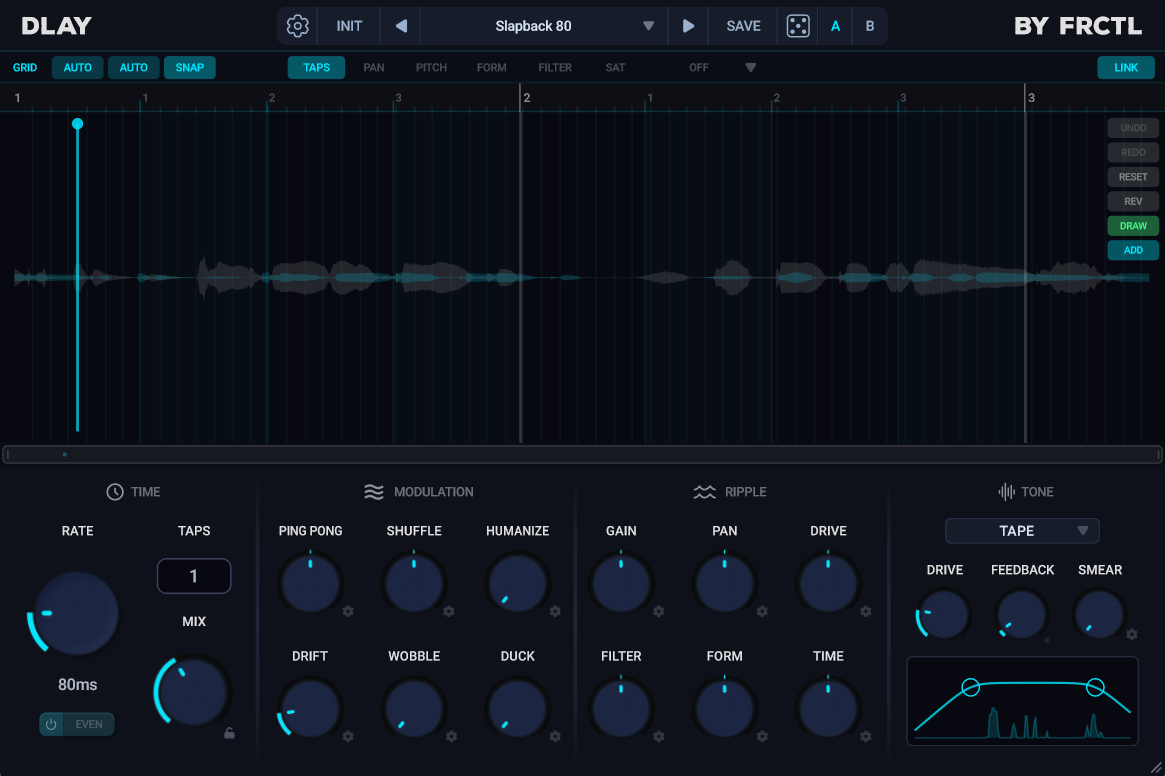
Slapback is the oldest trick there is, and it still works. A single short repeat, no rhythmic sync, somewhere between 80 and 120 ms with the feedback at or near zero. You do not hear it as a distinct echo. You hear the voice get thicker and a little more urgent, the rockabilly and old-soul sound.
Set the delay time in milliseconds, not note values, and keep it mono or close to it. If 100 ms feels too obvious, drop toward 80. If the track is slow and roomy, push toward 120. One repeat is the whole point, so resist adding feedback.
2. Dotted 1/8 (the rhythmic workhorse)
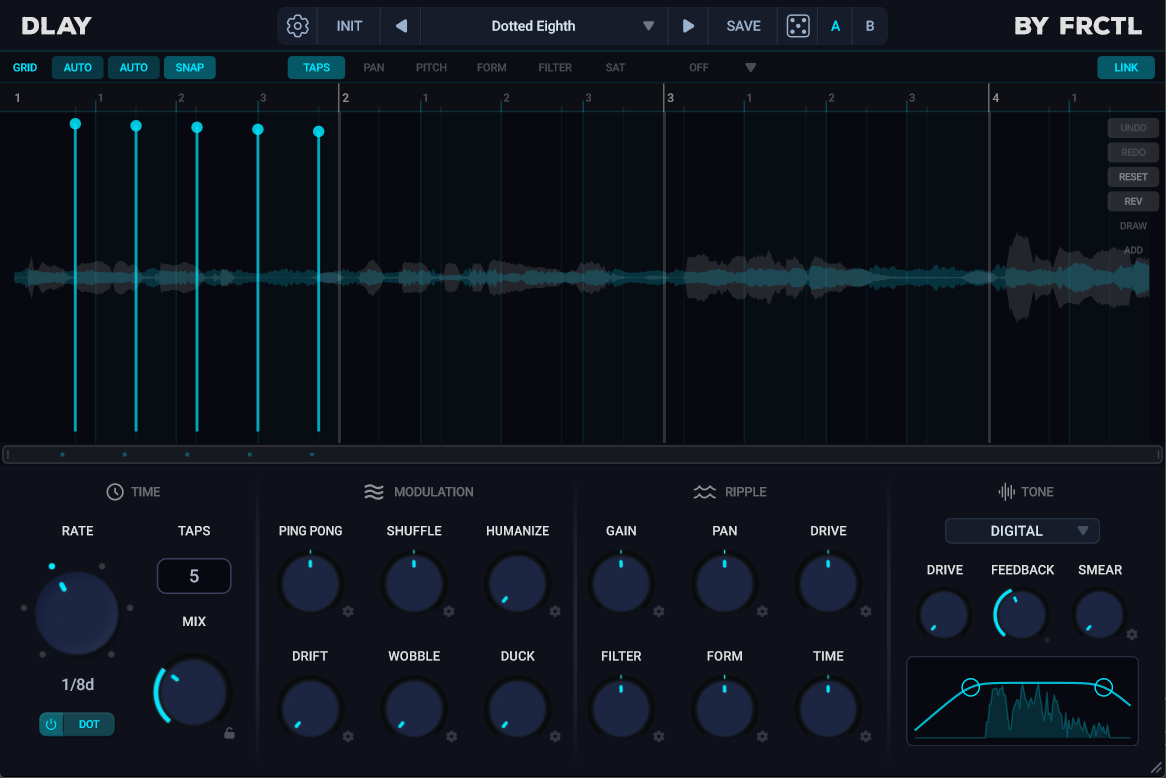
The dotted eighth note is the delay you have heard on a thousand records, from The Edge guitars to modern pop vocals. It lands three sixteenths apart, so the repeats fall off the main beats instead of stacking on top of them. That is why it adds groove and width without clashing with the rhythm of the part.
Sync it to the tempo, set feedback low so you get two or three repeats and no more, and keep the wet level under the dry. If it starts sounding busy, that is feedback, not the delay time. Pull the feedback down before anything else.
3. Ping-pong (width without a wider take)
Ping-pong bounces each repeat between the left and right speakers. On a mono vocal it opens up a sense of stereo space without you having to record a second take or fake a double. It is great on ad-libs, backing vocals and hooks where you want size.
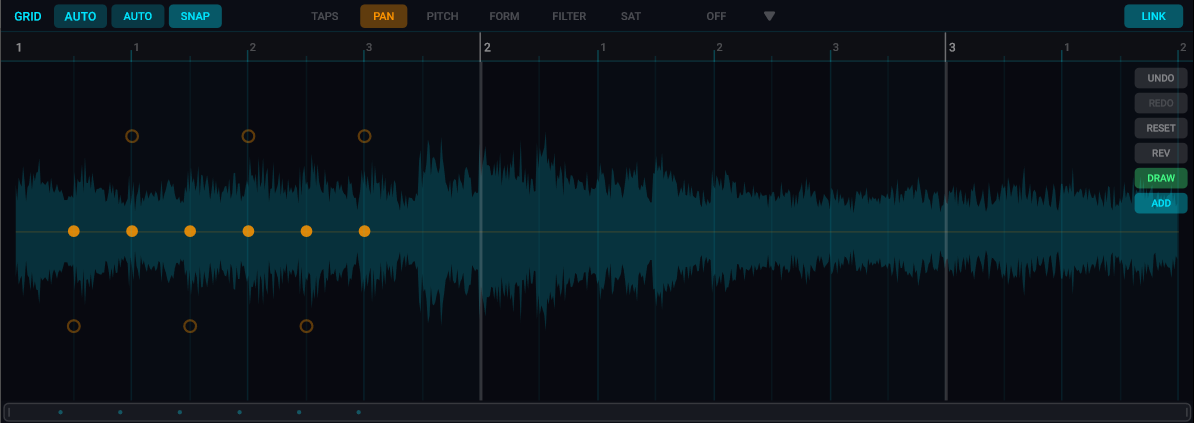
Keep the original voice centered and let only the repeats travel out to the sides. Two or three bounces is plenty. With a multi-tap delay you can place the taps yourself: alternate them hard left and hard right and drop the level on each one so the trail walks outward and fades.
4. Throws (delay on one word, not the whole line)
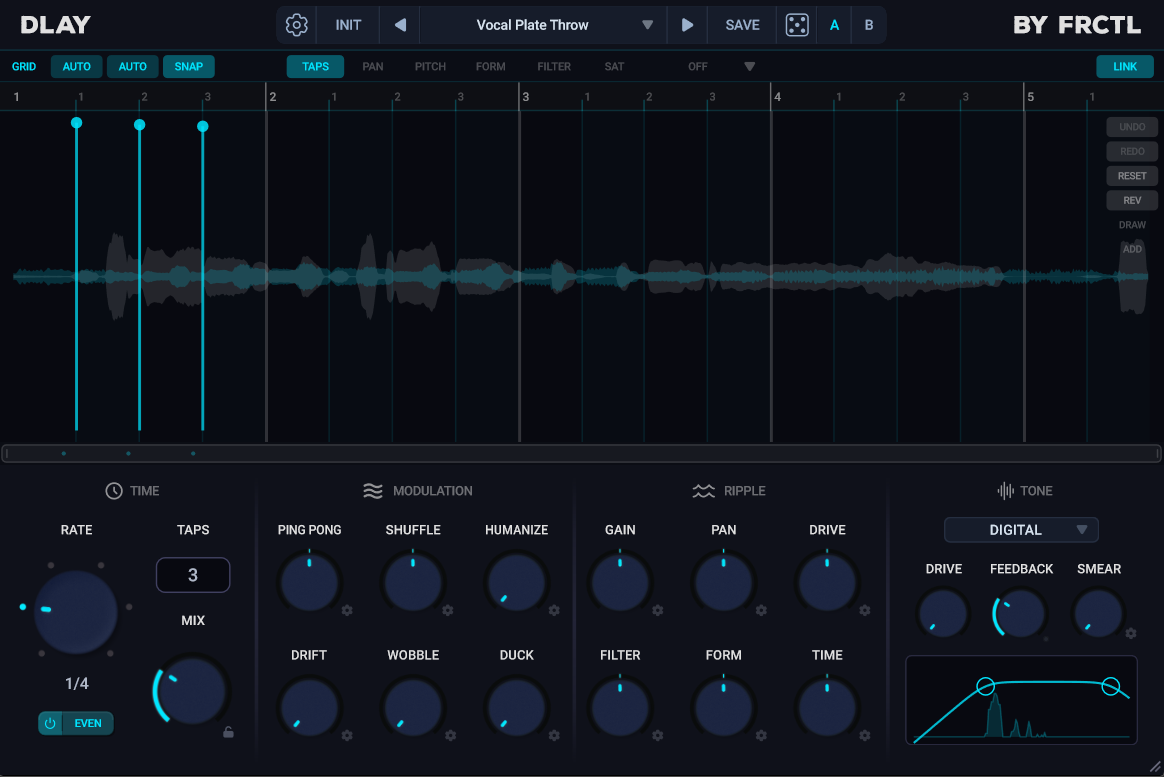
A throw is a long, obvious delay that only fires on a single word, usually the last word of a line. Everything else stays dry, then that one word gets flung into a long feedback tail. It is the classic transition move into a chorus or a drop.
The cleanest way to do it is automation: keep the delay send at zero, then ride it up for the half-beat the target word lands on and pull it straight back down. Use a 1/4 or 1/2 note time with a few audible repeats. Because nothing else feeds the delay, the line stays intelligible and only that word trails off.
5. Ducked delay (big tails that never wash out the voice)
This is how you get long, lush delay tails on a lead vocal without losing a word. Put a compressor on the delay return and sidechain it to the dry vocal, with a fast attack and a fast release. Now the repeats duck out of the way while the singer is singing and swell up to fill the gaps between phrases.
It is the trick behind those modern pop vocals that sound drenched in delay but still crystal clear. Set the threshold so the wet signal drops a few dB whenever the lead comes in, and let it breathe back in the silences. If your delay plugin can duck against the input directly, even better, you skip the extra routing.
6. Vocal halos (per-tap pitch)
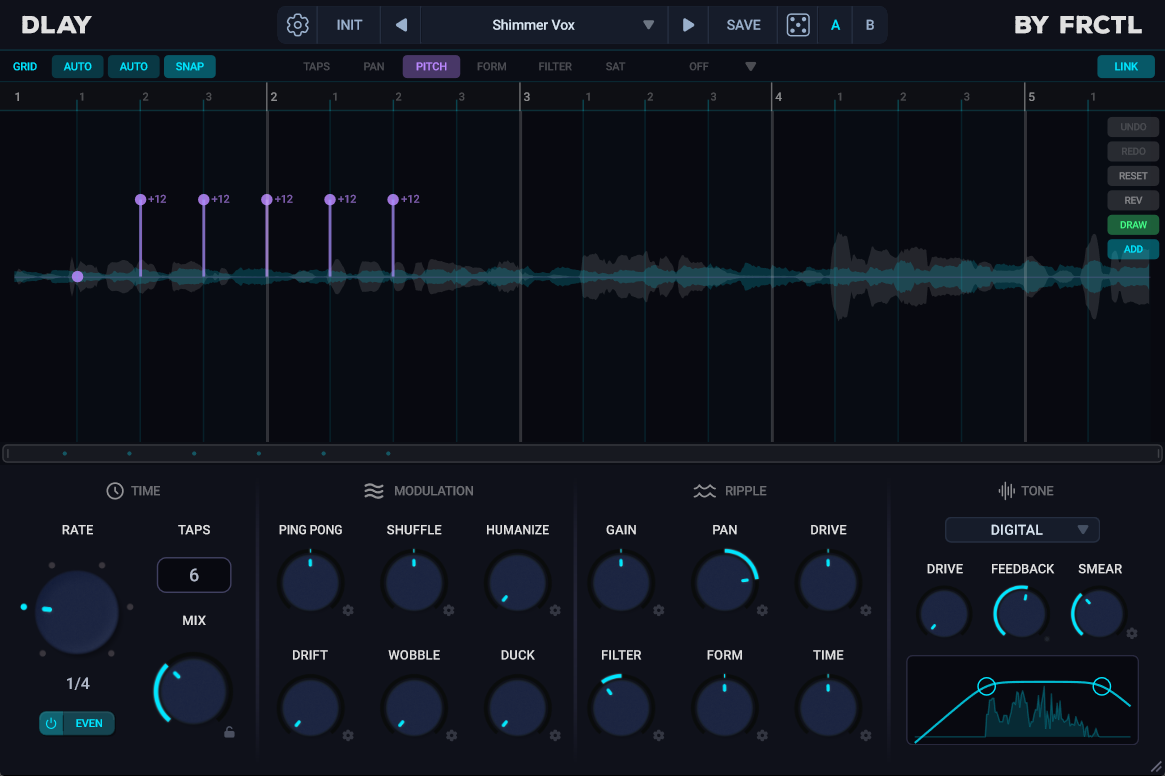
Halos are where a multi-tap delay pulls ahead of a normal one. Instead of every repeat coming back at the original pitch, you pitch individual taps up an octave for a shimmering halo over the top, or down an octave for a dub-style trail underneath. No separate pitch shifter, no bouncing to a new track.
In DLAY every tap can shift up to two octaves and move its formant independently, so an octave-up halo still sounds like a voice instead of a chipmunk. Try one tap at +12 semitones, low in the mix, behind a clean lead. It is the kind of finish that usually means three plugins and an afternoon, done with a couple of taps.
7. Stack two delays (the pro-mix secret)
A lot of polished vocals are not running one delay, they are running two. A short slapback for body and a longer rhythmic or ping-pong delay for space, each on its own return, each filtered separately. The slapback glues the voice together up close while the longer delay places it in a room.
Keep both quiet. The slapback you should feel more than hear, and the long delay should sit just under the dry. Two subtle delays layered nearly always beat one delay cranked, because each one is doing a smaller, cleaner job.
Vocal Delay Times by Tempo
| Note value | 90 BPM | 120 BPM | 140 BPM |
|---|---|---|---|
| 1/4 note | 667 ms | 500 ms | 429 ms |
| Dotted 1/8 | 500 ms | 375 ms | 321 ms |
| 1/8 note | 333 ms | 250 ms | 214 ms |
| 1/8 triplet | 222 ms | 167 ms | 143 ms |
| 1/16 note | 167 ms | 125 ms | 107 ms |
Conclusion
None of these need an expensive plugin. The routing, the filtering and the rhythm choice matter far more than the brand on the GUI. Get the send and the EQ right first, then pick the technique that fits the song: slapback for intimacy, dotted 1/8 for groove, ping-pong for width, throws for transitions, ducking for big clean tails.
The two that genuinely need a capable delay are halos and hand-built ping-pong, because they rely on per-tap pitch and per-tap panning. That is what DLAY is built for: up to 64 taps you place by hand, each with its own pitch, pan and filter, for $34.99. If you want to see how it stacks up against the rest of the field, the best cheap delay plugins under $50 breaks down the options, free ones included.
Frequently Asked Questions
What delay time should I use on vocals?
For a slapback, set 80 to 120 ms in milliseconds with very little feedback. For rhythmic delay, sync to the tempo and use a dotted 1/8 (lands off the main beats for groove) or a 1/4 note for a more spacious feel. At 120 BPM that is roughly 375 ms for a dotted 1/8 and 500 ms for a quarter note. Keep feedback low so you get two or three repeats, not a wash.
Should vocal delay go on a send or an insert?
A send. Routing the delay to its own aux return lets you EQ and compress the wet repeats without touching the dry vocal. That is what makes it possible to high-pass and low-pass the echoes, and to duck them against the lead. An insert ties the wet and dry together and takes those options away.
How do I stop delay from making vocals muddy?
Three things. High-pass the delay return around 250 to 400 Hz to cut low-mid buildup, low-pass it around 6 to 8 kHz to tame sibilant repeats, and keep feedback low so echoes do not pile up. For long tails, sidechain a compressor on the return to the dry vocal so the repeats duck while the singer is singing.
What is a delay throw?
A throw is a long delay that only fires on a single word, usually the last word of a line. You keep the delay send at zero and automate it up for the half-beat that word lands on, then pull it back down. The result is a long trailing echo on one word with the rest of the line staying dry and clear. It is a common move heading into a chorus or drop.
What is the difference between slapback and ping-pong delay on vocals?
Slapback is a single short repeat (80 to 120 ms, no sync, mono) that thickens a voice without an audible echo. Ping-pong bounces the repeats between the left and right speakers to add stereo width. Slapback is about intimacy and body up close; ping-pong is about size and space. Many mixes use both at once on separate sends.
What is the best delay plugin for vocals?
Plenty of delays handle slapback and rhythmic echoes well, and there are strong free options like Valhalla Supermassive. Where it gets specialised is halos and hand-shaped ping-pong, which need per-tap pitch and per-tap panning. DLAY ($34.99) is built for that: up to 64 taps placed by hand, each with independent pitch, formant, pan and filter, plus a dedicated Vocals preset category to start from.
Try DLAY free for 14 days
DLAY is a 64-tap delay you shape by hand — seven character modes, twelve rhythm patterns, and per-tap pitch and formant. The trial is the full plugin, on Windows, macOS and Linux.