Most granular roundups mix two different tools into one list. A granular effect sits on a track and chops up whatever is already playing. A granular sampler is an instrument: you load a sample into it, put it on a MIDI track, and play the grains from a keyboard. If you want to turn a field recording into a pad, or a Splice one-shot into something you can hold a chord on, you want the second kind, and the effects will not get you there. This list is samplers only. Every entry loads your own audio and plays it over MIDI. The lineup runs from a free open-source synth to Arturia's flagship, with the dedicated granular instruments from Audio Damage, Baby Audio, Dawesome and FRCTL in between, plus the one that ships inside Ableton Live. For each one: what it does with your sample, what it costs, and where it falls short. Every price was checked against the maker's own store or a named retailer in September 2026, and sale prices are marked as sale prices.
GRNi
$44.99Best value, and the one built around playing chords
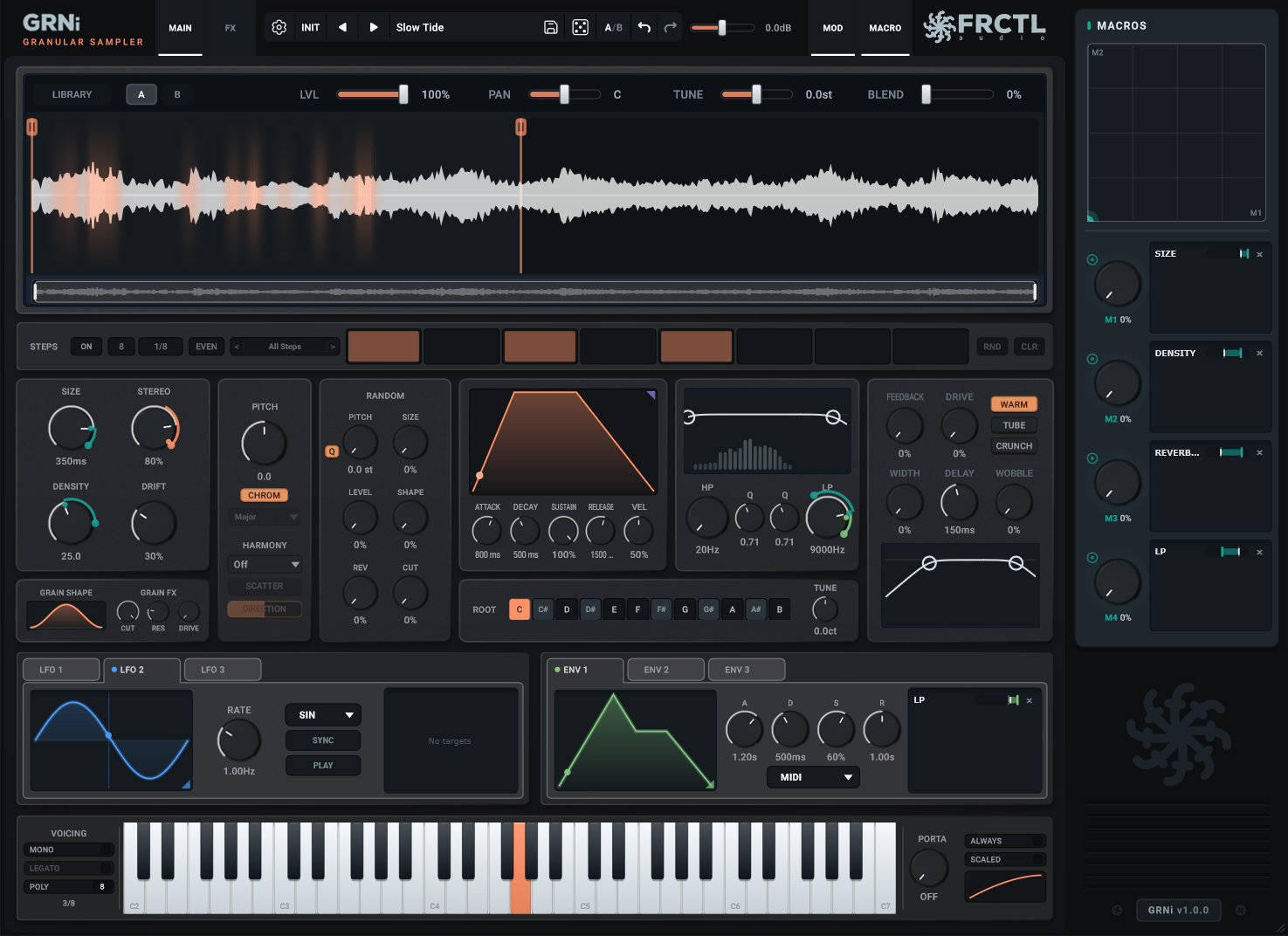
GRNi does one thing differently from everything else on this list: every note you hold gets its own stream of grains. That matters more once you start playing than it does while you are tweaking. Plenty of granular engines run one grain cloud and split it across whatever notes are down, so a four-note chord sounds thinner than a single note. In GRNi a four-note chord carries four times the grains, and each note reads its own spot in the sample, spread along your selection instead of piled on one point. Chords get thicker, not thinner.
The workflow is drop, draw, play. Drop a WAV, AIFF, FLAC, OGG or MP3 on the waveform (on Windows, straight out of Splice or the Ableton browser), drag the selection edges to the slice you want, and play. A second sample goes in layer B, and BLEND decides grain by grain which layer each new grain reads from, so the two sounds breathe into each other rather than crossfading. Each layer keeps its own selection, level, pan and tune. SCALE mode locks the pitch knob and the per-grain pitch jitter to one of ten scales, which is what keeps a scattered cloud sounding like a chord and not a cluster.
Underneath that sits a proper synth: MONO, LEGATO and POLY voicing up to 16 voices, per-note ADSR with velocity, portamento with a curve, 3 LFOs, 3 envelopes, 4 macros on an XY pad, a step sequencer, a resonant filter, a feedback engine and a 10-slot FX rack you reorder by drag. On an MPE controller each finger bends its own note, pressure scales its level, and slide moves that note's read position through the sample. It runs as VST3, AU, CLAP and a standalone app on Windows, macOS and Linux, with a 14-day trial that needs no card and a 14-day money-back guarantee after that.
The honest limits. It is version 1.0, released September 2026, so there is no track record yet. It ships 52 presets, and those presets carry engine settings only: they never replace your sample, which is great once you have one loaded and confusing for the first thirty seconds when you have not. There is no factory sample library, no AAX for Pro Tools, and each layer holds 60 seconds at 48 kHz, so a long field recording needs trimming first.
Pros
- +One grain stream per held note, so a four-note chord carries four times the grains
- +Two sample layers blended grain by grain, each with its own selection, level, pan and tune
- +SCALE mode with 10 scales quantizes both the pitch knob and the per-grain jitter
- +16-voice polyphony with mono, legato and poly voicing, per-note ADSR and portamento
- +MPE: per-note bend, pressure and slide on any MPE controller
- +3 LFOs, 3 envelopes, 4 macros with XY pad, step sequencer, 10-slot reorderable FX rack
- +VST3, AU, CLAP and standalone on Windows, macOS and Linux
- +$44.99 with a 14-day free trial and a 14-day money-back guarantee
Cons
- −Version 1.0 from September 2026, no long track record yet
- −52 presets, and they carry no sounds: you need a sample loaded before any preset makes noise
- −No factory sample library and no AAX
- −60 seconds per layer at 48 kHz, so long recordings need trimming first
Best for: Producers and composers who want to play a sample as an instrument, hold chords on it, and stay in key while the grains scatter. The best price on this list for a full granular instrument.
Learn more →Try it free for 14 days →Audio Damage Quanta 2
$129 (seen at $99 on sale)The dedicated granular synth everyone names first
Quanta 2 is the granular instrument that comes up in every forum thread, and it earns that. Drop a sample in (AIFF, WAV, Broadcast WAV, FLAC, MP3 or Ogg, any rate or bit depth), and each voice can run up to 100 grains at once, each up to a second long.
What makes it a synth rather than a sampler with a grain mode is everything around the grains: two virtual analogue oscillators, dual multimode filters, a stack of flexible envelope generators, MPE, and MTS-ESP microtuning. Audio Damage covers more formats and platforms than anyone here: CLAP, VST3 and AAX on Windows, those plus AU on macOS, CLAP, VST3 and LV2 on Linux, and a standalone AUv3 on iPad. Presets come from Richard Devine, Chris Carter and Red Means Recording, among others.
The limits: $129 at list is nearly three times GRNi, though it turns up at $99 on sale. It holds one sample; the second and third sources are oscillators, not another sample. Audio Damage does not publish a voice count on the product page. And the demo runs for twenty minutes at a stretch before it goes silent until you reload it, which is enough to hear it and not enough to build with it.
Pros
- +Up to 100 grains per voice, each up to one second long
- +Two analogue-style oscillators, dual filters and deep envelopes around the grain engine
- +MPE and MTS-ESP microtuning
- +CLAP, VST3, AAX, AU and LV2 across Windows, macOS, Linux and iPad
- +Presets from Richard Devine, Chris Carter and Red Means Recording
Cons
- −$129 at list, so wait for the $99 sale
- −One sample slot; the extra sources are oscillators
- −Voice count is not published by the maker
- −The demo stops after twenty minutes per session
Best for: Sound designers who want a full granular synthesizer with analogue oscillators and filters around it, and who work across Linux or iPad as well as desktop.
Baby Audio Grainferno
$129 (launched at $79, often discounted)Two samples, seven morph modes, and grains at audio rate
Grainferno arrived in March 2026 with a lot of press behind it, and there is substance behind the noise. It loads two samples at once and morphs between them in real time with seven modes (Bedroom Producers Blog lists them as Crossfade, Follow, Weave, 4-Bit, 8-Bit, Random and Bi Follow), which is a different idea from a plain layer mix. The trick that got the press is speed: the grain engine can fire fast enough to reach audio rate, at which point grains stop reading as texture and start acting like an oscillator, so any sample becomes a pitched synth voice that stays in tune with the song.
It ships with 325 presets, 378 royalty-free factory samples, six template configurations, three envelopes, three LFOs, three random generators and six effect modules (filter, compressor, clipper, delay, reverb and chorus). Formats are VST, VST3, AU and AAX plus a standalone app, on Windows 10 and macOS 10.11 upward. There is a free trial.
The limits come straight from the reviews. MusicTech gave it 8 out of 10 and listed complex patches spiking the CPU, no independent grain controls for each sample layer, and a relationship between input and output that "feels elusive at times". Baby Audio does not state MPE support, and there is no CLAP build and no Linux build. The list price is $129; the $79 was an introductory offer, so treat any lower figure as a sale, not the price.
Pros
- +Two samples morphed in real time with seven morph modes
- +Audio-rate grains turn any sample into a tuned synth voice
- +325 presets and 378 factory samples, so it makes sound the moment it opens
- +VST, VST3, AU, AAX and standalone, with a free trial
Cons
- −$129 list, and the $79 launch price is gone
- −No independent grain controls per layer (MusicTech's main criticism)
- −Complex patches can spike the CPU
- −MPE not stated by the maker, no CLAP, no Linux
Best for: Producers who want a preset-rich granular instrument with a big factory library and a morphing two-sample engine, on Windows or macOS, and who do not need MPE or Linux.
Dawesome Novum
$179 (seen at $107 on sale)The deepest one: six granular layers from a single sample
Novum, from Dawesome and published by Tracktion, is the most elaborate dedicated granular instrument on this list. Its algorithm breaks a sample into up to six independent granular layers, and a Timbre Flower reshapes the spectrum on top. If the other entries are instruments, this one is closer to a resynthesis laboratory with a keyboard attached.
It has full MPE support, and it runs as AU, VST3 and AAX on macOS and VST3 and AAX on Windows. That is also the first limit: no Linux and no CLAP. The second is price. $179 makes it the most expensive dedicated granular instrument here, and while it went to $107 in a 40 percent sale that ran to June 2026, that was a sale. The third is that six independent layers is a lot to manage when all you wanted was a pad from a vocal, and the depth that makes it special also makes it the slowest to a first usable sound.
Pros
- +Up to six independent granular layers decomposed from one sample
- +Timbre Flower for spectral reshaping on top of the layers
- +Full MPE support
- +The deepest resynthesis engine in this price range
Cons
- −$179 at list, the priciest dedicated granular instrument here
- −No Linux and no CLAP build
- −Six layers is slow to a first usable sound if you only want a pad
Best for: Sound designers and composers who want the deepest granular resynthesis available under $200 and are happy to spend time in it.
Arturia Pigments 7
$199A flagship synth that happens to have a granular engine
Pigments is not a granular sampler. It is a large multi-engine synthesizer where granular is one engine among virtual analogue, wavetable, sample, harmonic and modal, and that is exactly why it belongs on this list: a lot of people already own it and do not realise it can do this. Load a sample into the sample and granular engine, switch to granular, and the interface animates what the engine is doing in real time while you play. MPE is supported across the whole instrument.
The case against it is the case for it. At $199 you are paying for five other engines (virtual analogue, wavetable, sample, harmonic, modal), a modulation system, a sequencer and an effects section, which is a bargain if you want all that and a poor deal if you wanted a granular instrument. The granular engine is one of Pigments' faces, not its whole design, so per-note grain behaviour and sample-first workflow are not where it puts its effort. Formats are VST, VST3, AAX, AU and NKS on Windows 10 and macOS 11 upward. No Linux, no CLAP.
Pros
- +Granular engine inside a full flagship synth, with animated real-time feedback
- +MPE across the whole instrument
- +Virtual analogue, wavetable, sample, harmonic, modal and granular engines in one plugin
- +Large preset library and a mature modulation system
Cons
- −$199, most of which buys engines you may not want
- −Granular is one engine among several, not the design centre
- −No Linux and no CLAP
Best for: Producers who want one big synth for everything and will use its granular engine as one colour among many, or who already own Pigments and have not tried it.
Ableton Granulator III
Included with Live 12 Suite (EUR 599, around $749 in the US)The one inside Live 12, and it is good
Robert Henke's Granulator has been the reason to own Live Suite for a long time, and the third version widened it into a real instrument. Three playback modes cover the usual ground: Classic works like Granulator II, Loop is for rhythmic material, and Cloud is for drones and textures. It captures audio live, supports MPE for per-note pitch, grain position and grain size, and ships 59 presets plus device templates. Sound on Sound has a full walkthrough if you want to go deeper.
The limit is the obvious one: it is a Max for Live device, so it exists inside Ableton Live and nowhere else. It is included with Live 12 Suite, and Live 12 Standard users need to add Max for Live to run it. If you are in FL Studio, Logic, Bitwig, Reaper or Cubase, it is not an option, and the Image-Line forum question "what is the FL equivalent of Ableton's Granulator" is one that GRNi, Quanta 2 and Grainferno answer and Granulator III cannot.
Pros
- +Classic, Loop and Cloud modes cover textures, rhythms and drones
- +MPE control of pitch, grain position and size per note
- +Live audio capture straight into the grain buffer
- +Free if you already own Live 12 Suite
Cons
- −Ableton Live only, as a Max for Live device
- −Live 12 Standard needs Max for Live added; not in Intro
- −Not an option in any other DAW
Best for: Live 12 Suite owners, who should try it before buying anything else on this list.
Glitchmachines Palindrome 2
$69Four granular samplers for morphing sound design
Palindrome 2 is a sound-design instrument first and a keyboard instrument second. It runs four granular sampler modules and morphs between them on a plotting grid, and Glitchmachines pitches it at experimental sound design, morphing effects and unusual instrument patches rather than at holding down a pad. It ships 80-plus presets and 1.5 GB of samples, takes your own samples across the four modules according to Synth Anatomy, and costs $69 as VST3 and AU.
Two limits keep it at number seven. Polyphony is four notes, which is fine for textures and a hard wall for chords. And the system requirements are narrow: Glitchmachines lists macOS 11 or later and Windows 11, with no AAX, no CLAP and no Linux. Glitchmachines does not state MPE support.
Pros
- +Four granular sampler engines morphed across a grid
- +1.5 GB of factory samples and 80-plus presets
- +$69, the cheapest paid entry after GRNi
Cons
- −Four-note polyphony
- −Windows 11 is the listed PC requirement; no Linux
- −MPE not stated; VST3 and AU only
Best for: Sound designers building morphing textures and rhythmic sound effects, on a current OS, who do not need to play chords.
gRainbow
FreeBest free granular sampler, open source
gRainbow is a free, open-source granular synthesizer that takes a different route to playing samples in tune. It runs pitch detection on your audio (Spotify's BasicPitch model) and uses what it finds to choose grain candidates for each note, so a melodic recording maps itself across the keyboard without you setting a root note. It is fully polyphonic across the MIDI range, runs up to 100 grains at once, and Synth Anatomy reports VST3, AU and LV2 builds for Windows, macOS and Linux.
It is GPL-licensed and distributed from GitHub and Gumroad, which cuts both ways. There is no support desk, the release cadence is whatever the developer has time for, and pitch-detection mapping works best on pitched material and least well on noise and drums. But as a free way to find out whether you want a granular sampler at all, before spending $45 to $199 on one, nothing beats it.
Pros
- +Free and open source
- +Pitch detection maps a melodic sample across the keyboard automatically
- +Polyphonic, up to 100 grains at once
- +VST3, AU and LV2 on Windows, macOS and Linux
Cons
- −Pitch-detection mapping suits pitched material, not drums or noise
- −Open-source project: no support desk, releases when the developer has time
- −CLAP and AAX not listed
Best for: Anyone who wants to try a granular sampler for nothing, and Linux users who want a free option alongside GRNi and Quanta 2.
Comparison Table
| Plugin | Price | Sample layers | MPE | Formats | Platforms |
|---|---|---|---|---|---|
| GRNi | $44.99 | 2, blended per grain | Yes | VST3, AU, CLAP, standalone | Win / Mac / Linux |
| Quanta 2 | $129 (~$99 sale) | 1 + 2 oscillators | Yes | CLAP, VST3, AU, AAX, LV2, AUv3 | Win / Mac / Linux / iPad |
| Grainferno | $129 | 2, morphed | Not stated | VST, VST3, AU, AAX, standalone | Win / Mac |
| Novum | $179 (~$107 sale) | Up to 6 | Yes | VST3, AU, AAX | Win / Mac |
| Pigments 7 | $199 | 1 (one engine of many) | Yes | VST, VST3, AU, AAX, NKS | Win / Mac |
| Granulator III | With Live 12 Suite | 1, live capture | Yes | Max for Live device | Ableton Live only |
| Palindrome 2 | $69 | 4 modules, 4 voices | Not stated | VST3, AU | Win 11 / Mac |
| gRainbow | Free | 1, pitch-detected | No | VST3, AU, LV2 | Win / Mac / Linux |
Granular sampler vs granular effect: what actually differs
Both use the same trick. Audio gets cut into grains of a few milliseconds to a few hundred, and those grains are replayed with their own pitch, position, length and spacing, layered until a new sound comes out. The difference is where the audio comes from and how you control it.
A granular effect lives on an audio track. Its source is whatever is playing through it: a drum loop, a vocal, a synth. It reads a buffer of the recent past and granulates that, and you shape the result with knobs and automation. Output Portal, Arturia Efx Fragments and GRN are effects. They are the right tool when the sound already exists on the track and you want to smear, stretch or freeze it.
A granular sampler lives on an instrument track. Its source is a file you loaded, and you play it from a keyboard: each MIDI note starts grains at a pitch, an envelope shapes them, and the note stops when you let go. That is what turns a recording into an instrument you can hold a chord on. Everything on this list is that kind. The two blur at the edges (GRN's MIDI Pitch Mode retunes a frozen buffer to held notes, and Granulator III can capture live audio), but the question to ask is simple: do you want to process what is playing, or play what you loaded?
Why per-note grains matter once you play chords
One detail separates instruments built for playing from instruments built for tweaking. In a lot of granular engines there is one grain scheduler. It fires grains at a set density, and when you hold a chord, those grains are shared out across the notes. Hold one note and it sounds full. Hold four and each note gets a quarter of the grains, so the chord comes out thinner than the single note did.
An engine that runs a grain stream per voice does the opposite. Each held note gets its own scheduler at the full density, so four notes means four times the grains, and the chord thickens. GRNi is built this way, with each note also reading its own window into the sample so the four streams spread across the recording instead of stacking on one spot. Quanta 2 runs up to 100 grains per voice, which is the same idea stated as a spec. If pads and chords are the goal, this is the spec sheet line to look for, and it is the one most roundups never mention.
Also worth knowing
A few instruments did not make the ranked list but deserve a line. New Sonic Arts Granite (£89) is a long-running granular texture generator with motion recorders and cycle modulators, sold as standalone, AU, VST3 and VST2 on Mac and standalone, VST3 and VST2 on Windows; the maker does not list a USD price or MPE. Steinberg Padshop 2 ($129.99 at KVR) pairs a granular oscillator with a spectral one, takes your own samples by drag and drop, and ships 570-plus presets, but it is a synth-first design with a big factory library rather than a sample-first one. Delta Sound Labs Stream Pro, shown at NAMM 2026 as XStream, promises eight-voice polyphonic sample playback with MPE on Windows, macOS and Linux at $99, and was listed for pre-order at $79 as of September 2026, so check that it has shipped before you count on it.
On the free side, Quilcom Caster runs up to 24 grains per note polyphonically and loads your own WAVs, but it is a 32-bit Windows-only VST, which rules it out of most current DAWs. And if you only want to try the technique on a track that already exists, GRN Lite is a free granular effect with two knobs, which is a different tool but a fast way to hear what grains do.
If you are in FL Studio, Logic or Bitwig
Your DAW may already have a granular sampler. Logic Pro's Alchemy imports audio and has a Granular analysis mode, so a loaded sample can be played chromatically across the keyboard with grain controls; MusicTech and Sound on Sound both have walkthroughs. FL Studio ships Fruity Granulizer, which is the answer on the Image-Line forum when someone asks for an FL equivalent of Granulator (DirectWave gets named too). Both are worth an hour before you spend money.
Where they run out is the same place stock tools usually do: no second sample layer, no scale-locked jitter, and limited or no MPE. That is when a dedicated instrument earns its price, and at $44.99 GRNi is the cheapest step up on this list that adds all three, with a trial that does not need a card.
Conclusion
For most producers the best granular sampler in 2026 is GRNi at $44.99. It is built around one grain stream per note, each reading its own window into the sample, so chords bloom instead of thinning, and it adds two blended sample layers, scale-locked jitter, MPE and a full modulation and FX system, on Windows, macOS and Linux in VST3, AU and CLAP. The 14-day trial means finding out costs nothing.
If you want a granular synthesizer with analogue oscillators wrapped around the grains and you work on iPad or Linux, Audio Damage Quanta 2 is the established pick, especially at its $99 sale price. Baby Audio Grainferno is the preset-rich, big-library choice for Windows and macOS producers who want sound out of the box and do not need MPE. Dawesome Novum is for the sound designer who wants six layers and has $179 to spend on it. Pigments 7 is for people who want one synth for everything. Granulator III is free with Live 12 Suite and should be the first stop for anyone who already has it. And gRainbow is a real, free granular sampler that runs everywhere, which makes it the right way to find out whether you want one at all.
Pick by how you play, not by the longest spec sheet. If chords and pads are the point, look for per-note grains first. If you want a granular effect for audio that already exists on a track, that is a different list: start with the best granular synthesis plugins roundup, or the cheap granular plugins under $50 guide if budget is the constraint.
Frequently Asked Questions
What is a granular sampler plugin?
A granular sampler is an instrument plugin that loads an audio file, cuts it into grains of a few milliseconds to a few hundred milliseconds, and plays those grains back from a MIDI keyboard. Each note starts grains at a pitch, an envelope shapes them, and the sound stops when you release the key. It turns any recording into a playable instrument, most often a pad, a drone or a set of keys.
What is the difference between a granular sampler and a granular effect?
A granular effect sits on an audio track and granulates whatever is playing through it, so its source is the track itself and you shape it with knobs. A granular sampler sits on an instrument track, its source is a file you loaded, and you play it over MIDI. Output Portal and GRN are granular effects. GRNi, Quanta 2, Grainferno, Novum and Granulator III are granular samplers.
What is the best granular sampler plugin?
GRNi ($44.99) is the best granular sampler for most producers in 2026. It runs one grain stream per held note so chords get thicker rather than thinner, blends two sample layers grain by grain, quantizes grain jitter to a scale, and supports MPE, on Windows, macOS and Linux. Audio Damage Quanta 2 is the best pick if you want analogue oscillators and filters around the grains, and gRainbow is the best free option.
Is there a free granular sampler plugin?
Yes. gRainbow is a free, open-source granular synthesizer that loads your own audio, detects its pitch, and maps it across the keyboard polyphonically with up to 100 grains at once. It runs as VST3, AU and LV2 on Windows, macOS and Linux. Ableton Granulator III is also free if you already own Live 12 Suite, but it only works inside Ableton Live.
Which granular samplers support MPE?
GRNi, Audio Damage Quanta 2, Dawesome Novum, Arturia Pigments 7 and Ableton Granulator III all state MPE support. In GRNi each finger bends its own note, pressure scales that note's level, and slide moves the note's read position through the sample. Baby Audio Grainferno and Glitchmachines Palindrome 2 do not state MPE support on their product pages.
Which granular sampler plugins run on Linux?
GRNi runs on Linux as VST3, CLAP and a standalone app. Audio Damage Quanta 2 ships CLAP, VST3 and LV2 builds for Linux. gRainbow is open source with Linux builds. Grainferno, Novum, Pigments 7 and Palindrome 2 are Windows and macOS only, and Granulator III needs Ableton Live.
Can I use Ableton Granulator III in FL Studio or Logic?
No. Granulator III is a Max for Live device and only runs inside Ableton Live 12, either Suite or Standard with Max for Live added. FL Studio users have Fruity Granulizer built in and Logic users have Alchemy's granular mode. For a dedicated cross-DAW granular sampler, GRNi, Quanta 2 and Grainferno all run as standard plugins in any host.
Why do chords sound thin in some granular synths?
Many granular engines run a single grain scheduler and share its grains across every note you hold, so a four-note chord gets a quarter of the grains per note and sounds thinner than one note did. Instruments that run a grain stream per voice, such as GRNi, give every held note its own scheduler at full density, so chords get thicker as you add notes.
Want to play your samples as grains?
GRNi turns any sample into a playable granular instrument, with one grain stream per note. Try it free for 14 days, no card needed.