Trackspacer by Wavesfactory is a sidechain EQ. You put it on one track, feed it another, and it turns the first track down only in the frequencies the second one is playing, so a vocal can sit over a pad without the whole pad getting quieter. It uses 32 bands, runs as VST, VST3, AU and AAX on Windows and macOS, and costs $59 at list (€59 on Wavesfactory's own store). It goes on sale often, and it was $29 at Plugin Boutique in December 2025. There is no Linux build and no CLAP. The five alternatives below do the same job in different ways: DUKR ($13.99 until November 30, 2026, then $18.99), ANINA (free), TDR Nova (free), Baby Audio Smooth Operator Pro ($129) and FabFilter Pro-Q 4 ($199). Every price and spec was checked against the maker's own page or a named retailer in November 2026.
DUKR
$13.99 until Nov 30, 2026, then $18.99Best Trackspacer Alternative Overall
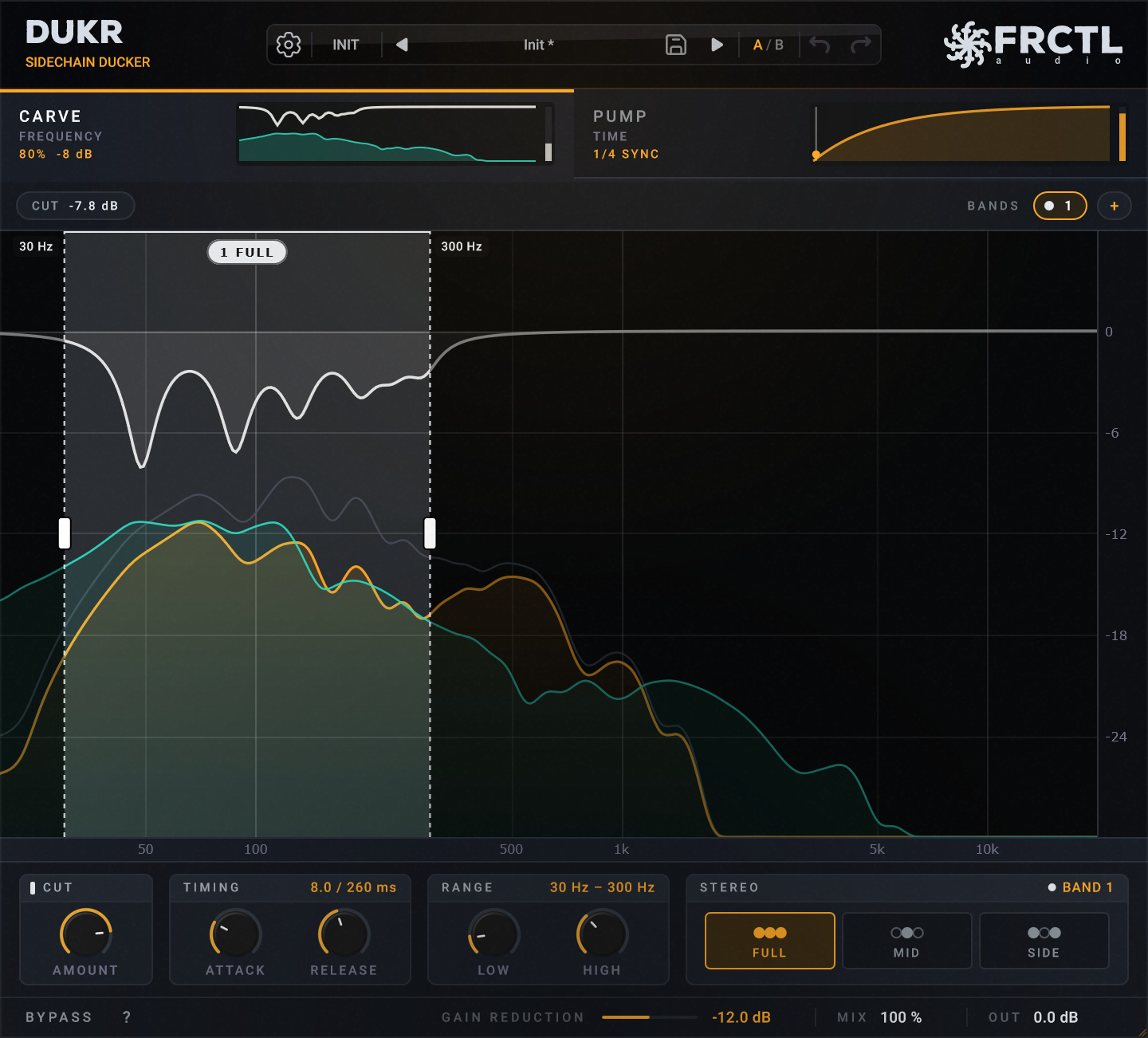
DUKR's CARVE stage is the closest match to Trackspacer on this list. It reads the sidechain across 32 bands from 40 Hz to 18 kHz and cuts those frequencies out of your track while the sidechain plays, by up to 24 dB. ATTACK and RELEASE set how fast the cut comes and goes, and a MID or SIDE setting keeps a wide pad's stereo image intact under a centred vocal. You can run up to four carve bands, each with its own frequency range and timing, which helps when the kick and the vocal both need room in the same bass.
The other half of DUKR is PUMP, a volume duck shaped by a curve you draw. Press TRACE and DUKR draws that curve from whatever is on the sidechain, following each hit's real decay. The duck can follow your DAW's tempo, the sidechain's level or a MIDI note, and with a MIDI trigger, soft notes can duck less than hard ones. Trackspacer has no equivalent, so DUKR replaces both a sidechain EQ and a sidechain pump plugin.
Neither stage adds latency, and DUKR reports none to your DAW. It runs as VST3 and CLAP on Windows, macOS and Linux, plus AU on the Mac, with an offline serial and no account. The trial is the full plugin for 14 days.
Pros
- +32-band frequency carve, the same band count as Trackspacer
- +Up to four carve bands, each with its own range, attack and release
- +Full, mid-only or side-only carving
- +A drawn volume duck (PUMP) in the same plugin, with TRACE to draw it from the sidechain
- +Tempo, sidechain or MIDI note triggers, with velocity
- +Zero latency in both stages
- +VST3 and CLAP on Windows, macOS and Linux, AU on macOS
- +14-day full trial, offline serial, no account
Cons
- −No AAX, so no Pro Tools (Trackspacer has AAX)
- −Released in October 2026, so it has a much shorter track record than Trackspacer
- −In Logic Pro the MIDI trigger needs a second plugin, DUKR MIDI, on a Software Instrument track
Best for: Producers who want Trackspacer's job plus a drawn sidechain pump in one plugin, for under $20, including on Linux.
Learn more →Try it free for 14 days →ANINA
FreeBest Free Trackspacer Alternative
ANINA, from the developer Ewan Bristow (published as CRQL), is a free spectral resonance suppressor with a sidechain input. Fed a sidechain, it pushes down your track where the sidechain is loud, with far more bands than Trackspacer: at least 256, and up to 1024. It came out in February 2026, and Bedroom Producers Blog called it a free rival to Trackspacer a few weeks later.
The fine resolution has a cost. ANINA's spectral processing adds about 11 ms of latency on average, which matters if you play or record through it. It runs as VST3, AU and CLAP on Windows, macOS and Linux, and it is free, with an optional donation.
Pros
- +Free
- +At least 256 bands, up to 1024
- +Sidechain input for Trackspacer-style ducking
- +Freeze and delta listening for hearing what it removes
- +VST3, AU and CLAP on Windows, macOS and Linux
Cons
- −About 11 ms of latency from the spectral processing
- −Built first as a resonance suppressor, so the sidechain use is one mode of a broader tool
- −A one-developer project, released in 2026
Best for: Anyone who wants frequency ducking for free and doesn't need zero latency.
TDR Nova
Free (paid GE version available)Best Free Dynamic EQ for Manual Ducking
TDR Nova from Tokyo Dawn Labs is a free dynamic EQ with four bands plus high- and low-pass filters, and its bands can react to an external sidechain. That lets you set up a duck by hand: place a band where the kick and bass overlap, key it from the kick, and that band dips each time the kick plays.
The difference from Trackspacer is who decides the frequencies. Trackspacer follows whatever the sidechain is playing, while Nova only moves the bands you placed, so it suits a known clash (one kick against one bass) better than a vocal that moves around. The free version has four bands, and the paid GE version adds more. Nova runs as VST2, VST3, AU and AAX on Windows and macOS, and as a Linux build.
Pros
- +Free
- +Each band can be keyed from an external sidechain
- +Precise control over exactly which frequencies duck
- +Windows, macOS and Linux
Cons
- −You place the bands yourself; it doesn't follow the sidechain's spectrum
- −Four dynamic bands in the free version
- −More setup than a one-knob tool
Best for: Producers with a fixed clash, like kick against bass, who want a free tool and don't mind setting the bands by hand.
Baby Audio Smooth Operator Pro
$129 (often discounted)Best for Spectral Balancing With a Sidechain
Smooth Operator Pro is a spectral balancer: it evens out a sound's frequency balance on its own. Its sidechain mode, in Baby Audio's words, uses "the spectral content of another track in your mix to rebalance the current signal", which makes it a Trackspacer alternative with tone shaping built in.
It lists at $129 and is discounted often. Plugin Boutique had it at 58% off in early November 2026. It runs as VST, VST3, AU and AAX on Windows 10 or later and macOS 10.11 or later.
Pros
- +Sidechain mode reacts to another track's spectrum
- +Also works as a standalone spectral balancer
- +AAX for Pro Tools
- +Frequent large discounts
Cons
- −$129 at list
- −Windows and macOS only, no Linux or CLAP
- −More than you need if all you want is ducking
Best for: Mix engineers who also want a spectral balancer and can wait for a sale.
FabFilter Pro-Q 4
$199Best if You Already Own It
FabFilter Pro-Q 4 is a full EQ, and its dynamic bands can each trigger from the external side chain instead of the track itself. Like TDR Nova, it ducks the frequencies you choose rather than following the sidechain's spectrum, with more bands and a spectral dynamics mode for finer, per-frequency control within a band.
At $199 it makes little sense to buy for ducking alone. If you already own it, it may already cover the job. It has a zero-latency mode and runs as VST, VST3, AU, CLAP and AAX on Windows and macOS, with a 30-day trial.
Pros
- +Each dynamic band can be keyed from the external side chain
- +Spectral dynamics mode for per-frequency control within a band
- +Zero-latency mode
- +VST, VST3, AU, CLAP and AAX
- +30-day trial
Cons
- −$199, the most expensive option here
- −You place the bands yourself
- −Windows and macOS only, no Linux
Best for: Producers who already own Pro-Q 4, or want one EQ that also does sidechain ducking.
Comparison Table
| Plugin | Price | How it ducks | Formats | Platforms |
|---|---|---|---|---|
| Trackspacer | $59 (often on sale) | Follows sidechain, 32 bands | VST, VST3, AU, AAX | Win/Mac |
| DUKR | $13.99 to Nov 30, then $18.99 | Follows sidechain, 32 bands, plus drawn volume duck | VST3, AU, CLAP | Win/Mac/Linux |
| ANINA | Free | Follows sidechain, 256 to 1024 bands | VST3, AU, CLAP | Win/Mac/Linux |
| TDR Nova | Free | Bands you set, keyed by sidechain | VST2, VST3, AU, AAX | Win/Mac/Linux |
| Smooth Operator Pro | $129 (often discounted) | Sidechain mode rebalances by spectrum | VST, VST3, AU, AAX | Win/Mac |
| FabFilter Pro-Q 4 | $199 | Bands you set, keyed by sidechain | VST, VST3, AU, CLAP, AAX | Win/Mac |
What Trackspacer actually does
Trackspacer is a 32-band EQ whose cuts are set by another track. It analyses the sidechain signal and applies the opposite curve to the track it sits on, so where the sidechain is loud, your track gets quieter, and only there. A kick on the sidechain takes the low end out of a bass for the length of the hit. A vocal on the sidechain makes a pocket in a pad while the singer sings.
Its controls are few: an amount knob, low- and high-cut filters, stereo, mid or side processing, attack and release, and an advanced panel. That simplicity is a big part of why producers still recommend it. It has been around for over a decade (version 2.0 came out in 2013), and its current version, 2.5.10, dates from April 2023.
Frequency ducking versus volume ducking
Classic sidechain ducking, the kind Cableguys Kickstart or a sidechained compressor does, turns the whole track down when the kick hits. Frequency ducking, Trackspacer's kind, turns down only the frequencies the two tracks share. Volume ducking gives you the audible pump of dance music. Frequency ducking is meant to be heard less: the bass keeps its top end, the pad keeps its shimmer, and only the overlap moves.
Most mixes use both. DUKR is the only plugin on this list that does both in one instance, with CARVE for the frequency cut and PUMP for the volume duck. The others are frequency tools only, so for a pump you would still add a second plugin.
How to choose a Trackspacer alternative
Start with whether you want the plugin to follow the sidechain's spectrum or to duck frequencies you pick yourself. Trackspacer, DUKR, ANINA and Smooth Operator Pro follow the sidechain. TDR Nova and Pro-Q 4 duck the bands you set, which is more work but more precise for one known clash.
- Lowest price for the Trackspacer workflow: DUKR
- Free, following the sidechain: ANINA (about 11 ms of latency)
- Free, bands set by hand: TDR Nova
- Pro Tools (AAX): Trackspacer, Smooth Operator Pro, TDR Nova or Pro-Q 4
- Linux: DUKR, ANINA or TDR Nova
- Zero latency while recording: DUKR, or Pro-Q 4 in its zero-latency mode
Conclusion
Trackspacer is still a good plugin, and if you work in Pro Tools or already own it, there is little reason to switch. For everyone else, DUKR does the same 32-band carve for $13.99 until November 30, 2026 ($18.99 after), with zero latency, Linux and CLAP builds, and a drawn sidechain pump in the same plugin. If your budget is zero, ANINA follows the sidechain for free at the cost of about 11 ms of latency, and TDR Nova does it by hand. Smooth Operator Pro and Pro-Q 4 make sense mainly if you want what else they do.
DUKR's trial is the full plugin for 14 days. For ducking a reverb tail rather than a whole track, see how to sidechain reverb under a vocal.
Frequently Asked Questions
What is Trackspacer?
Trackspacer is a sidechain EQ plugin by Wavesfactory. It uses 32 bands to turn one track down only in the frequencies another track is playing, so a vocal or kick gets room without the whole track getting quieter. It runs as VST, VST3, AU and AAX on Windows and macOS.
How much does Trackspacer cost?
Trackspacer costs $59 at list, or €59 on Wavesfactory's own store. It is discounted often, and it was $29 at Plugin Boutique in December 2025.
What is the best cheap alternative to Trackspacer?
DUKR is the cheapest paid alternative, at $13.99 until November 30, 2026 and $18.99 after. Its CARVE stage uses 32 bands like Trackspacer, adds up to four separately timed bands and mid or side carving, and runs with zero latency on Windows, macOS and Linux.
Is there a free Trackspacer alternative?
Yes. ANINA is a free spectral plugin with a sidechain input and 256 to 1024 bands, though it adds about 11 ms of latency. TDR Nova is a free dynamic EQ whose four bands can be keyed from a sidechain, but you choose the frequencies yourself.
Does Trackspacer work on Linux?
No. Trackspacer runs on Windows and macOS only. DUKR, ANINA and TDR Nova all have Linux versions, and DUKR and ANINA also come as CLAP.
What is the difference between Trackspacer and sidechain compression?
Sidechain compression turns the whole track down when the sidechain hits. Trackspacer turns it down only in the frequencies the sidechain is playing, so the rest of the track keeps its level. DUKR does both in one plugin: CARVE for the frequency cut and PUMP for a drawn volume duck.
Can I use Trackspacer to make room for vocals?
Yes, that is one of its main uses: put it on the music or a pad and feed it the vocal, and the music dips only where the vocal sits, only while it sings. DUKR's CARVE does the same, and its MID setting keeps a wide pad's stereo width under a centred vocal.
Try DUKR free for 14 days
The full plugin, with CARVE and PUMP and zero latency, on Windows, macOS and Linux.